 Options Wheel Trader
How Roll Finder Helps You Manage Wheel Positions
July 29, 2026
Introduction
Finding a first cash-secured put or covered call is only half the wheel. The other half is managing positions when they go against you, approach assignment, or sit near expiration with little premium left.
Rolling by hand means comparing dozens of strike and expiration combinations, checking bid/ask, estimating net credit, and then typing everything into a roll form. That is slow, easy to misprice, and hard to repeat consistently.
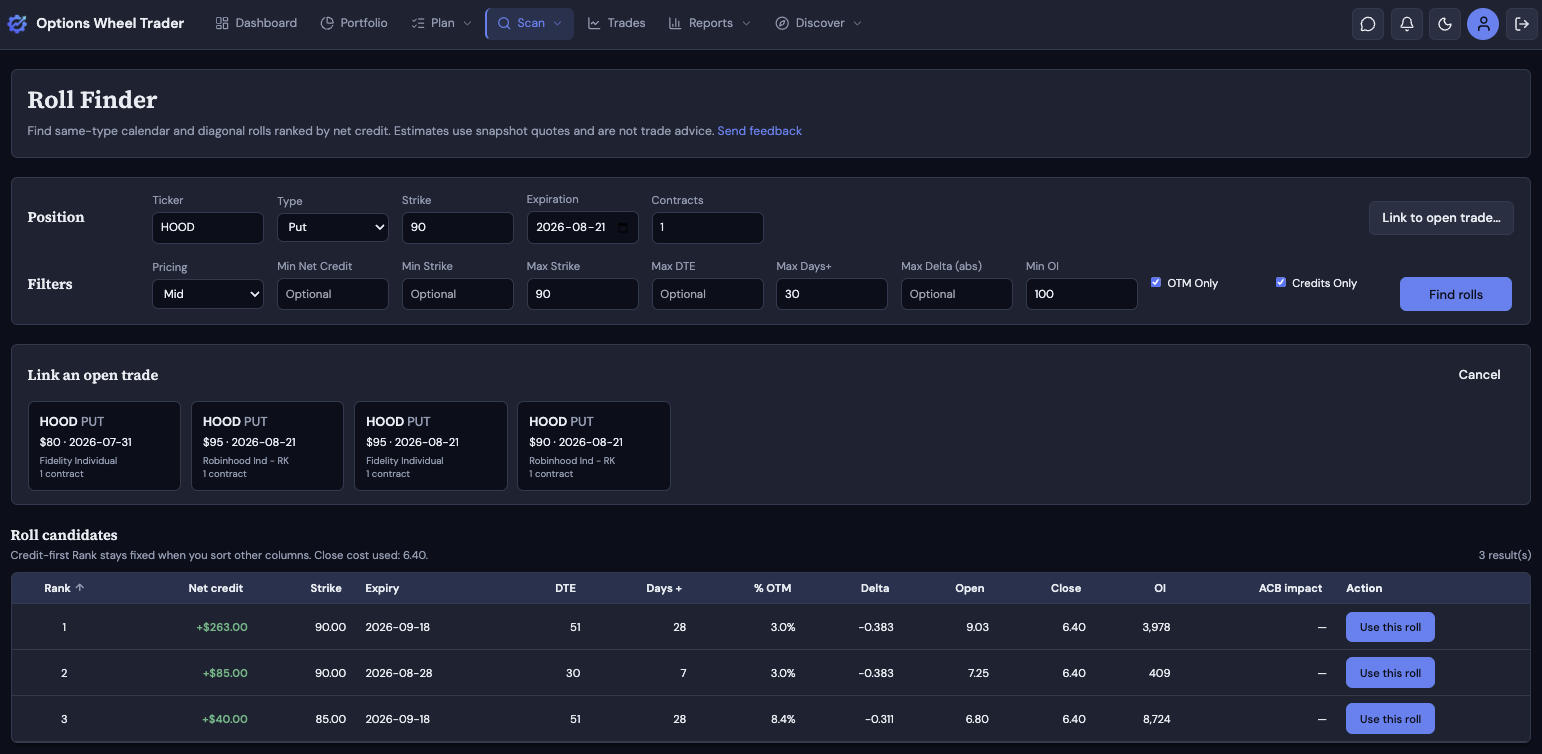
Roll Finder in OptionsWheelTrader is built for that moment. It takes your current short put or call, scans same-type calendar and diagonal alternatives, and ranks them by net credit so you can compare trade-offs quickly, then jump into the roll workflow with fields already filled.
In the app, open Scan and choose Roll Finder. The feature is available on the Pro plan (same access as Options Scanner).
What problem Roll Finder solves
When a short option is in trouble (or simply worth extending), you usually have three choices: take assignment, close for a debit or credit, or roll into a new short.
A roll is two legs:
- Buy to close the current short.
- Sell to open a new short (often a later expiry, sometimes a different strike).
The useful question is not “is there an option somewhere on the chain?” It is: which combination collects the best net credit (or smallest debit) while still matching your plan?
Roll Finder answers that by:
- Loading the option chain for your ticker and type.
- Pricing the close and the new open under a pricing mode you choose.
- Computing net credit for each candidate.
- Ranking candidates credit-first, with filters for strike bounds, DTE, days extended, delta, open interest, OTM-only, and credits-only.
- Letting you Use this roll to prefill the existing roll page for review and submit.
It does not place the trade for you. You still review and submit on the roll screen.
Where to open it
You can start Roll Finder from several places:
| Entry | What happens |
|---|---|
| Scan → Roll Finder | Standalone calculator; enter ticker, type, strike, expiry, and contracts |
| Link to open trade (Position row) | Pick a matching open position so fields and cost-basis impact use that trade |
| Roll trade page (Find rolls button) | Opens Roll Finder with that trade already linked |
| Open Risk Radar | Find rolls on an open position |
| Trade quick view | Find rolls next to Roll |
Deep links use /discover/roll-finder?tradeId=… so the open leg loads automatically.
How it works: step by step
1) Set the position
The Position row holds the short leg you are rolling from. Enter (or load from a linked trade):
- Ticker
- Type (Put or Call)
- Strike
- Expiration
- Contracts
On the same row, use Link to open trade… to pick a matching open position from your book. When linked, the label shows Linked to: with a link to that trade, and the position fields lock to the open leg. Use Clear link if you want to run a what-if without tying results to a book position.
2) Choose filters and pricing
The Filters row sits below Position. Pricing is the first control there. Net credit depends on how you price each leg. Roll Finder supports:
| Mode | Close (buy to close) | Open (sell to open) | Intent |
|---|---|---|---|
| Mid (default) | Midpoint | Midpoint | Neutral estimate |
| Bid-Ask (conservative) | Ask | Bid | Harder fill assumptions |
| Ask-Bid (optimistic) | Bid | Ask | Easier fill assumptions |
Net credit is:
new open premium − close buyback premium
Positive means a credit roll; negative means a debit. Dollar results use the usual options multiplier (×100 × contracts).
Quotes come from market snapshots. Treat them as estimates, not guaranteed fills, and not as trade advice.
Other filter controls:
| Control | What it does |
|---|---|
| Min net credit | Floor on dollar net credit (optional) |
| Min strike | Only show new strikes at or above this price (optional) |
| Max strike | Only show new strikes at or below this price (optional) |
| Max DTE | Cap how far out new expiries can go from today (blank = no cap; never cuts off before your current expiry) |
| Max Days+ | Cap how many calendar days the new expiry can extend beyond your current expiry (optional) |
| Max Delta (abs) | Keep contracts whose absolute delta is at or below your limit (optional) |
| Min OI | Minimum open interest on the new contract (default 100) |
| OTM only | Keep only new strikes that are out of the money vs the underlying (default on) |
| Credits only | Hide debit rolls (default on) |
Min strike and max strike are plain dollar bounds: min means ≥ that strike, max means ≤ that strike, for both puts and calls. With OTM only on and no min/max set, Roll Finder searches the full OTM wing from the underlying price.
The current contract is always excluded so you do not “roll” into the same strike and expiry.
Roll Finder only searches same type (put→put or call→call) and same or later expirations (calendars and diagonals). It does not suggest switching puts to calls.
3) Review ranked candidates
Click Find rolls. Results appear in a table with:
- Rank (credit order; stays fixed even if you sort other columns)
- Net credit ($)
- New strike and expiry
- DTE and days extended
- % OTM and delta
- Open premium and close cost
- Bid/Ask on the new contract
- Open interest
- Projected ACB impact (when a trade is linked)
- Use this roll
Sort any column to inspect liquidity, delta, or time extension. Rank still reflects the credit-first ordering so you do not lose the “best credit” context while exploring.
4) Use this roll
When you pick a candidate:
- If a trade is linked, you go to
/trades/[id]/rollwith close price, new strike, expiry, premium, contracts, and delta prefilled. - If you started standalone, Roll Finder asks you to link an open trade that matches the ticker and type, then continues into that roll page.
You still confirm fees, dates, and quantities, then submit the roll through the normal workflow. That keeps validation, partial rolls, and roll-chain linking in one place.
Projected adjusted cost basis (ACB)
When results are tied to an open trade, Roll Finder can show a projected ACB impact for the close side of the roll, using the same wheel cost-basis ideas as the Adjusted Cost Basis report:
- Covered calls: closing/rolling the short call can adjust stock basis by net premium (premium collected minus buyback).
- Short puts: rolling typically does not change stock basis until assignment.
Standalone runs without a linked trade show “—” for ACB. Link a trade when you care about basis impact in the results table.
For a deeper walkthrough of how the product tracks wheel basis through rolls, see Understanding Adjusted Cost Basis.
How Roll Finder differs from Options Scanner
Both live under Scan and both are Pro features. They solve different jobs:
| Options Scanner | Roll Finder | |
|---|---|---|
| Job | Find new CSP/CC entries | Find rolls off an existing short |
| Ranking | Multi-factor score (yield, delta, liquidity, and more) | Credit-first net credit |
| Input | Watchlist / filters / presets | Current strike, expiry, type (optional linked trade) |
| Output | Ranked entry ideas | Ranked roll combinations + roll-page prefills |
Use the scanner when you are opening risk. Use Roll Finder when you are managing or extending an open short.
A practical workflow
- Review open risk in Open Risk Radar (or your trades list).
- For a position worth rolling, open Find rolls.
- Keep OTM only and Credits only on if that matches your playbook. Set Min OI (default 100) and Max Delta (abs) to match your liquidity and risk targets.
- Use Max DTE and Max Days+ when you want to cap how far out you are willing to extend. Use Min strike / Max strike to bound the strike ladder.
- Compare Rank 1 credit vs alternatives that extend less time or keep delta closer to your target.
- Click Use this roll, review the roll page, then submit.
After the fact, Roll Chains and Adjusted Cost Basis reports help you see whether the sequence improved the position.
Tips and limitations
- Same type only. Put↔call switches are out of scope for this version.
- No execute-from-finder. Prefill and review on the roll page keep your existing controls.
- Blank optional filters mean unconstrained. Empty Max DTE, Max Days+, Min/Max strike, or Max Delta does not silently reapply hidden defaults that can empty the chain.
- Min OI defaults to 100. Set it to 0 if you want thinner contracts in the results.
- Estimates only. Snapshot quotes can be delayed. Always confirm prices with your broker before trading.
Summary
Roll Finder turns “I should probably roll this” into a ranked list of same-type calendar and diagonal options, ordered by net credit, with pricing modes and filters that match how wheel traders think. Linked trades unlock cost-basis context and one-click prefills into the roll workflow you already use.
If you are on Pro, open Scan → Roll Finder on your next underwater or elevated-delta short and compare a few candidates before you roll by hand.
Ready to try Roll Finder?
Stop comparing roll strikes in a spreadsheet.
Get started with OptionsWheelTrader for free and use Roll Finder under Scan when you are ready to manage the next short put or covered call.
Related reading
- How the Options Scanner Works
- Understanding the Open Risk Radar Report
- Understanding Adjusted Cost Basis
- Track Wheel Trades
Legal disclaimer
The Roll Finder feature and this article are provided for informational and educational purposes only. They do not constitute financial, investment, tax, or legal advice. Nothing in this article or in the product should be interpreted as a personalized recommendation to buy, sell, roll, or hold any security or options contract.
Options trading involves substantial risk and is not suitable for all investors. You can lose money, including amounts tied to assignment, buybacks, and extended roll sequences. Outcomes depend on liquidity, volatility, assignment risk, and execution quality.
Roll rankings are model-based outputs derived from snapshot quotes and user-selected filters. They do not guarantee profitability, fill quality, or future performance.
Market data may be delayed, incomplete, or unavailable at times. Always confirm live prices, spreads, contract details, and account eligibility with your broker before entering any trade.
Past performance is not indicative of future results. OptionsWheelTrader is not a broker-dealer, does not execute trades, and does not provide individualized investment advice.
Review our Terms, Privacy Policy, and consult a qualified financial professional before trading options.