 Options Wheel Trader
Understanding the Adjusted Cost Basis Report
April 13, 2026
Introduction
If you run the wheel, you care about more than ticker symbols and expiration dates. You also care how option cash flows relate to stock cost basis when you sell puts, get assigned, sell covered calls, roll, or get called away. The Adjusted cost basis report in Options Wheel Trader is built for that: it is wheel portfolio information that shows how we model premiums against stock basis. It is informational only and not for tax filing. This article walks through what the report shows and how it works under the hood at a practical level.
Where to find it
In the app, open Reports and choose Adjusted cost basis. The report is available on Active and Pro plans. If you are on Starter, you will see an upgrade prompt instead of the full report.
What problem this report solves
Brokers show tax and regulatory cost basis. That is essential for filings, but it follows broker and IRS rules you do not control in a spreadsheet. Wheel traders often want a consistent, strategy-shaped view: “If I treat premiums the way I manage the wheel, what does my economic stock basis look like?”
This report answers that in one place per account and holding (ticker):
- Holding basis comes from your position as stored in the app (shares × average cost from the holding).
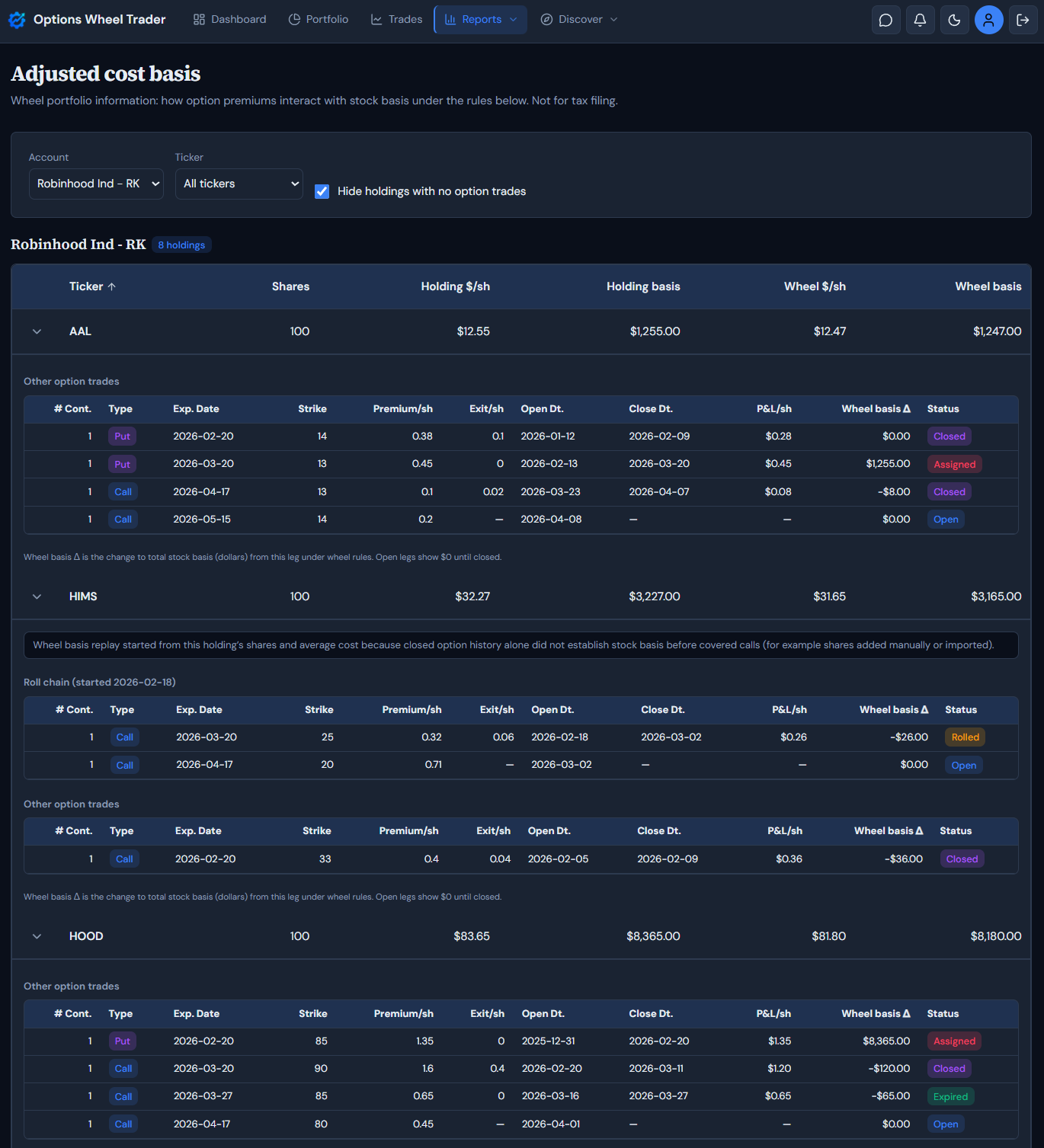
- Wheel basis is a modeled per-share and total basis after applying closed option legs in chronological order using the wheel rules implemented in the product (see below). You can sort holdings by ticker, shares, holding basis, or wheel basis, and use filters (account, ticker, and “hide holdings with no option trades”) to focus the list.
The summary table: columns explained
For each brokerage account, you get a table (on smaller screens, the same fields appear on cards). The columns are:
| Column | Meaning |
|---|---|
| Ticker | The stock symbol for this holding. |
| Shares | Share quantity on the holding. |
| Holding $/sh | Average cost per share from the holding record. If this is missing, downstream wheel numbers may be incomplete. |
| Holding basis | Total dollar basis for the position (shares × holding average cost when both are present). |
| Wheel $/sh | Modeled wheel adjusted cost per share after replaying closed option history for this account and ticker. |
| Wheel basis | Total dollar basis using wheel $/sh × shares when both are available. |
Holding columns reflect what you have recorded for the stock lot in the Portfolio screen. Wheel columns reflect the simulation that nets wheel-style option effects on top of that history.
Expanding a row: trades, roll chains, and “Wheel basis Δ”
Click a row to expand it. You will see:
- Optional notes when the system seeded the replay from your holding (for example when closed option history alone did not establish stock basis before covered calls, such as shares added manually or imported).
- A reconcile message if simulated share count or basis does not line up with the holding (for example missing average cost or a mismatch between trade history and shares on the holding).
- Roll chains grouped the same way as the Roll chains report: related legs follow linked trades so a roll reads as one story instead of scattered rows.
- Other option trades that are not part of a chain, listed for context.
- A detailed table per section with contracts, type, dates, strike, premium per share, exit price per share, P&L per share (premium minus exit when both exist), Wheel basis Δ, and status.
At the bottom of the expanded panel, when there are trades, you will see:
Wheel basis Δ is the change to total stock basis (dollars) from this leg under wheel rules. Open legs show $0 until closed.
So: open positions show $0 realized impact on stock basis until they close. Only closed legs participate in the forward simulation that drives the headline wheel numbers.
How the model works (high level)
The backend replays closed trades in time order and maintains a running simulated share count and per-share basis. Only sold puts and sold calls participate in the stock-basis simulation; long option legs are shown with no change to wheel stock basis.
Cash-secured puts
- If a short put assigns, we add shares at strike minus premium per share and blend that lot with any existing simulated position (same idea as assignment handling elsewhere in the app).
- If a short put expires or is closed without assignment, stock basis does not change in this model (premium is option P&L, not a change to shares you hold).
Covered calls
- Expired worthless: premium reduces wheel stock basis on the covered shares (dollar effect scaled by contracts × 100 shares, capped by simulated shares).
- Closed or rolled: we use net credit per share (premium minus buy-to-close price when present) to adjust basis the same way.
- Assigned: if some shares remain, we apply the product rule for remaining shares and premium; if all shares are delivered, the simulated stock position can go to zero.
If replaying from zero never produces a valid per-share basis (common when stock came from import or manual entry and only covered calls appear in history), we seed the simulation from the holding’s shares and average cost so covered-call premium math can still run. When that happens, the expand panel explains it.
What this report does not do
The product does not model wash sales, splits, dividends, corporate actions, gifted or inherited lots, or broker-specific tax-lot methods. It is a transparency tool for your wheel workflow, not a substitute for a CPA, tax software, or broker statements.
Disclaimer
This report uses wheel-style rules (options premiums netted against stock basis as modeled here). It is not tax advice and is not suitable for preparing tax returns, IRS reporting, or cost-basis reporting that must match broker 1099-B or tax lots.
Wash sales, corporate actions, gifted or inherited shares, specific lot identification, and other tax rules are not modeled. Where this report shows assumptions (for example how premium is applied when shares are called away), the breakdown is for transparency in your wheel portfolio, not a legal or tax position.
Closing thoughts
Use the Adjusted cost basis report when you want a single, auditable place to connect your holdings, your option history, and a wheel-consistent basis story. Pair it with disciplined trade logging so closes, rolls, and assignments stay accurate. Remember - garbage in, garbage out still applies.
Ready to Track Your Options Trades?
If you want to explore the report in the app, sign in and open Reports → Adjusted cost basis on an eligible plan. Get started with OptionsWheelTrader for free
This article is educational and not investment or tax advice. Options involve risk; read our Terms and consult a qualified professional as needed.