 Options Wheel Trader
How the Options Scanner Works (and Why It Can Improve Your Wheel Process)
April 21, 2026
Introduction
If you trade the wheel, you already know the hardest part is finding consistent, high-quality setups without spending hours jumping between watchlists, option chains, and spreadsheets.
That is exactly what the Options Scanner in OptionsWheelTrader is designed to solve. It helps you screen for cash-secured puts (CSPs) and covered calls (CCs), then ranks opportunities using the criteria that matter most to wheel traders.
In the app, open Scan in the top menu (Pro). On lower tiers the same link shows an upgrade path.
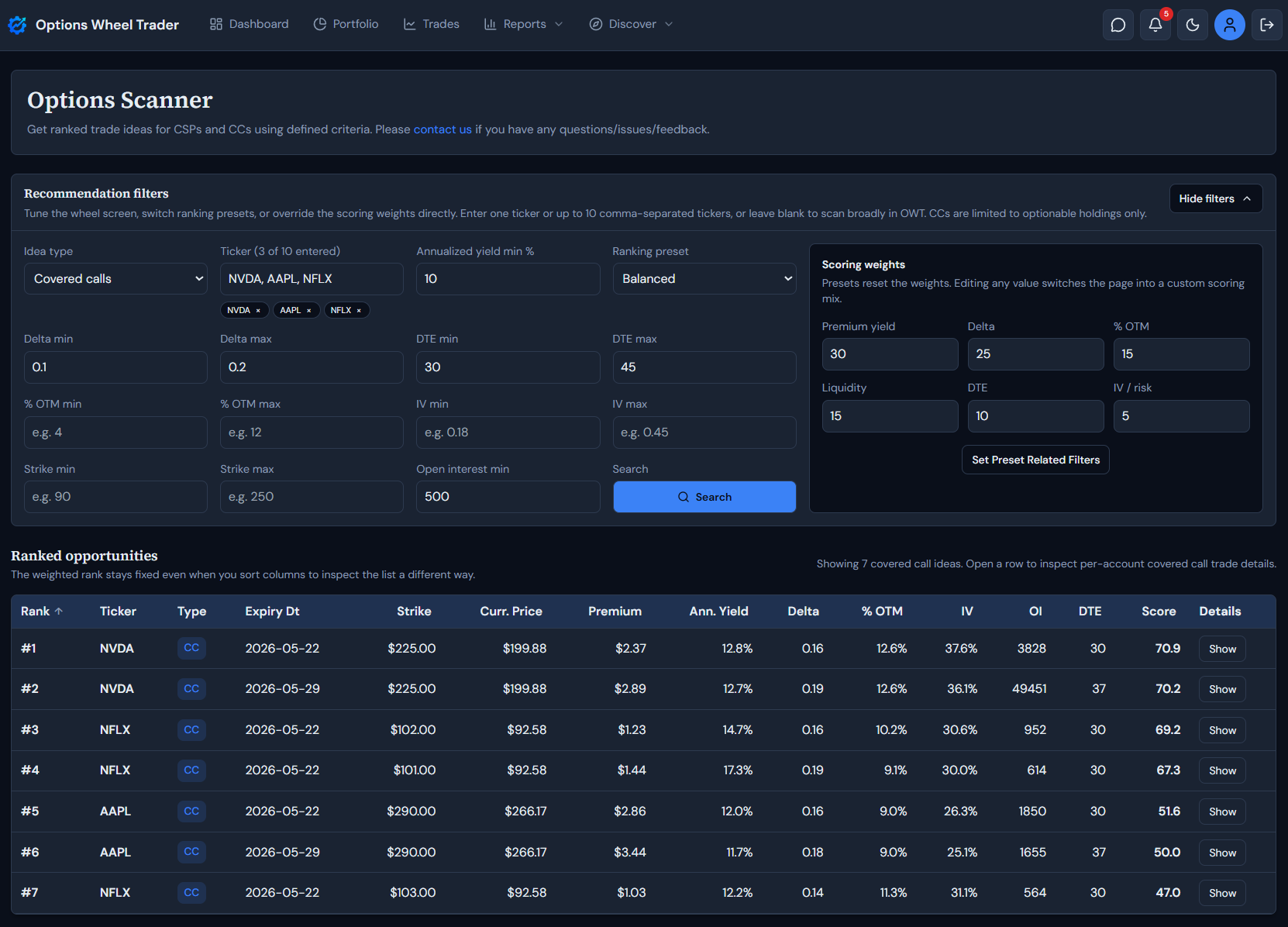
In this guide, we will break down how the scanner works, what each section means, and why it can make your workflow faster and more disciplined.
What the Options Scanner Does
At a high level, the scanner does three things:
- Filters contracts using your risk and return criteria.
- Scores each candidate with a weighted ranking model.
- Returns a ranked list you can inspect in detail before placing trades.
You can use it for both sides of the wheel:
- Cash-secured puts when you want to enter stock at a chosen strike.
- Covered calls when you already hold shares and want to generate income.
How It Works: Step by Step
1) Choose your idea type
You start by selecting:
- Cash-secured puts, or
- Covered calls.
This keeps the scan aligned with the wheel stage you are currently trading.
2) Set your filters
The scanner lets you narrow opportunities with practical constraints, including:
- Ticker (single symbol or CSV up to 10 tickers; duplicates are automatically cleaned up; leaving the field blank scans broadly across all tickers being traded in the Options Wheel Trader database)
- Annualized yield minimum
- Delta range
- DTE (days to expiration) range
- Percent out-of-the-money (% OTM) range
- Implied volatility (IV) range
- Strike range
- Minimum open interest
These filters help you avoid random contracts and focus only on trades that fit your playbook.
When you enter multiple tickers, the scanner processes valid symbols and surfaces any invalid or excluded symbols in the scanner warnings panel without blocking the rest of your search.
3) Pick a ranking preset (or customize weights)
You can choose one of three scoring presets:
- Yield-focused
- Balanced
- Safety-first
You can also switch to custom and directly set your scoring weights for:
- Premium yield
- Delta
- % OTM
- Liquidity
- DTE
- IV / risk
This is useful because two traders can look at the same option chain and want different things. The scanner lets you codify your preferences instead of re-deciding them manually every time.
You can learn more about the research behind the Options Scanner Presets.
4) Run search and review ranked opportunities
After you click search, results come back as a ranked table with key contract data:
- Rank
- Ticker
- Type (CSP or CC)
- Expiry date
- Strike
- Current price
- Premium
- Annualized yield
- Delta
- % OTM
- IV
- OI
- DTE
- Score
You can sort columns for inspection without losing the original weighted ranking context.
5) Open covered-call row details before acting
For covered calls, each recommendation has an expandable detail section with extra context, including:
- Per-account covered-call eligibility context
- Shares available by account
- Contracts available by account
This keeps covered-call ideas grounded in what you can actually write from each account.
For covered calls, the main list is also de-duplicated to one row per unique contract, with per-account context shown only in row details.
Why This Is Useful for Wheel Traders
1) Faster idea generation
Instead of manually checking dozens of chains, you can apply your criteria once and get a usable shortlist quickly.
2) More consistent decisions
When your filters and weights are explicit, trade selection becomes rule-based instead of mood-based. That consistency is a major edge in options trading.
3) Better alignment with your risk profile
A yield-first trader and a safety-first trader should not get the same priority list. The scanner supports both approaches.
4) Clearer trade quality signals
With rank, score, and core contract fields in one place, you can compare opportunities more objectively.
5) Improved covered-call workflow
For covered calls, the scanner includes account and share context so recommendations stay grounded in what you can actually write.
6) Less spreadsheet overhead
You spend less time building ad hoc screens and more time evaluating trades that already meet your baseline standards.
Suggested Workflow in Practice
Here is a simple process many wheel traders can use:
- Select CSP or CC based on your current wheel stage.
- Set your baseline filters (delta, DTE, OTM, liquidity, yield).
- Start with Balanced preset, then adjust toward Yield or Safety if needed.
- Review top-ranked ideas.
- For covered calls, open row details and confirm account eligibility context.
- Confirm live quote, spread, and chain liquidity in your broker before placing any order.
This gives you a repeatable flow you can run daily or weekly.
Important Notes
- Scanner outputs are informational and should support, not replace, your own due diligence.
- Market data can be delayed.
- Ranking quality depends on the criteria you choose.
Treat the scanner as a decision-support tool, not an autopilot.
Final Thoughts
The best wheel results usually come from disciplined process, not one-off “great picks.” The Options Scanner helps you build that process by turning your selection rules into a repeatable ranking workflow for CSPs and covered calls.
If you want fewer random trades and more structured opportunities, this is one of the most practical features to add to your routine.
Ready to Try the Options Scanner?
Stop hunting through chains manually.
Get started with OptionsWheelTrader for free and start scanning for wheel-friendly opportunities in minutes.
Legal Disclaimer
The Options Scanner and all related content are provided for informational and educational purposes only and do not constitute financial, investment, tax, or legal advice. Nothing in this article or in the product should be interpreted as a personalized recommendation to buy, sell, or hold any security or options contract.
Options trading involves substantial risk and is not suitable for all investors. You can lose money, including the full amount invested in a position, and outcomes can vary based on liquidity, volatility, assignment risk, and execution quality.
Scanner rankings are model-based outputs derived from user-selected filters and scoring weights. Rankings do not guarantee profitability, trade quality, or future performance.
Market data may be delayed, incomplete, or unavailable at times. Always confirm live prices, spreads, contract details, and account eligibility with your broker before entering any trade.
Past performance is not indicative of future results. OptionsWheelTrader is not a broker-dealer, does not execute trades, and does not provide individualized investment advice.
Review our Terms, Privacy Policy, and consult a qualified financial professional before trading options.