 Options Wheel Trader
Understanding the Entry Quality Report
June 11, 2026
Introduction
Most performance reports tell you what happened. Entry Quality helps you understand which setups tend to work for you.
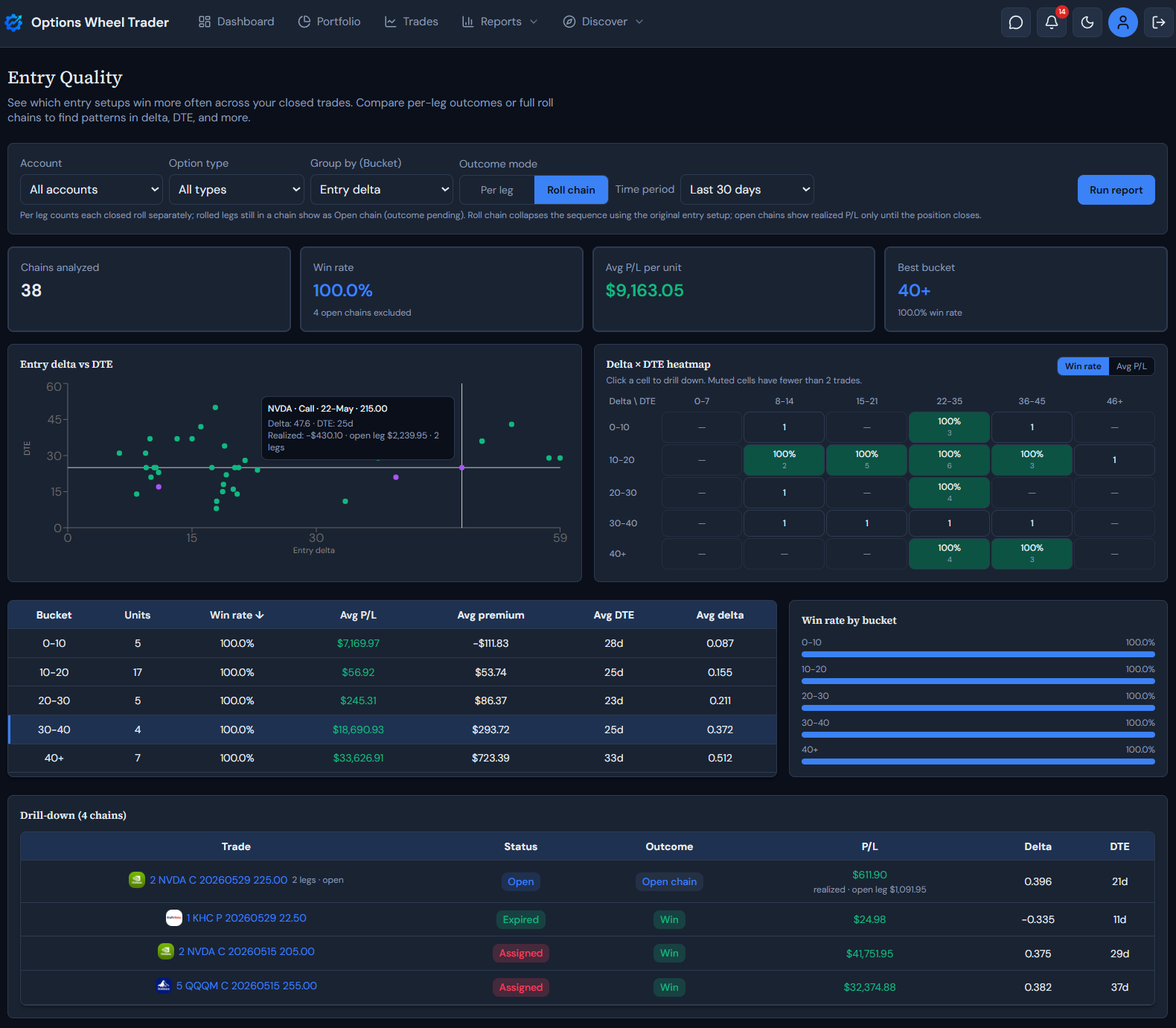
The Entry Quality report groups your closed trades (or full roll chains) by how you entered them: delta, days to expiry, distance to strike, premium collected, ticker, option type, and account. You can spot patterns like “20–30 delta puts with 21–35 DTE win more often than my 7 DTE trades.”
Where to find it
In the app, open Plan and choose Entry Quality.
The report is available on the Pro plan. Starter and Active users see an upgrade prompt.
What problem this report solves
Wheel traders repeat similar entry decisions every week: target delta, DTE, how far OTM to sell, and which tickers to favor. Without grouping outcomes by those choices, it is hard to know whether a losing streak is bad luck or a setup that does not fit your book.
Entry Quality answers:
- Which delta ranges win most often for you?
- Do longer-dated entries outperform short DTE trades?
- Does premium size correlate with better outcomes?
- Should you count each roll leg separately, or judge the whole chain?
Outcome mode: per leg vs roll chain
Per leg treats every closed trade as its own outcome. A three-leg roll shows up as three rows in the bucket table.
Roll chain collapses a roll sequence into one outcome:
- Entry metrics come from the original (root) leg.
- P/L is the sum of premium across all closed legs, plus stock P/L if the chain ends in an assigned call.
- Win/loss follows the same rules as Trade Insights, applied to the chain total when the chain is fully closed.
Use per leg when you want to grade each close. Use roll chain when you care whether the position worked from first entry to final exit.
Open chains (outcome still pending)
A rolled leg that was bought back for a debit is not a final outcome if you still have an open STO leg on the same chain. Entry Quality detects that situation in both modes:
- Outcome shows Open chain (not Win or Loss) until the position closes.
- Win rate excludes open chains so a BTC debit does not count as a finished loss while premium is still on the table.
- P/L in the drill-down shows realized on closed legs only, with an open leg preview when the live leg is linked.
In per leg mode, each Rolled row that belongs to an open chain is marked the same way. In roll chain mode, the whole sequence appears as one purple point or row with leg count and combined context.
Bucket dimensions
Group the table by any of these:
| Dimension | Example buckets |
|---|---|
| Entry delta | 0–10, 10–20, 20–30, 30–40, 40+ |
| DTE at entry | 0–7, 8–14, 15–21, 22–35, 36–45, 46+ |
| Distance to strike | 0–2%, 2–5%, 5–10%, 10%+ |
| Premium collected | <$50, $50–100, $100–200, $200–400, $400+ |
| Ticker, type, account | One bucket per value |
Trades missing a field (for example no entry delta) land in an Unknown bucket for 1D grouping. They are omitted from the scatter plot if delta or DTE is missing.
Scatter plot
Each point is one trade or one roll chain:
- Horizontal axis: absolute entry delta
- Vertical axis: DTE at entry
- Color: green = win, red = loss, gray = neutral, purple = open chain (outcome pending)
Hover the header line for full contract detail: ticker, option type, expiry (dd-mmm), and strike. The body shows delta, DTE, and P/L. For open chains, the tooltip adds realized closed-leg P/L, open leg preview, and leg count when the chain has more than one leg.
Delta × DTE heatmap
Rows are delta buckets; columns are DTE buckets. Each cell shows win rate or avg P/L (toggle above the chart). Cells with fewer than two trades are muted so single-trade noise does not dominate.
Click a cell to drill down into the trades or chains in that intersection.
Click a bucket row in the table to open a drill-down list for that group. The selected row stays highlighted. Drill-down columns include Status and Outcome badges, entry delta, DTE, and P/L (with realized / open-leg detail for open chains).
Win rate and P/L
Win rate = wins ÷ (wins + losses). Neutral and open chain outcomes are excluded from that ratio. The summary card notes how many open chains were left out when any are present.
Per-trade P/L matches Trade Insights: net option premium plus realized share P/L on assigned calls. Open chains use realized closed-leg premium only until the chain finishes.
Example workflow
- Open Plan → Entry Quality.
- Filter to Put, last 12 months, Per leg.
- Run the report and check the heatmap for a green cluster (for example 20–30 delta × 22–35 DTE).
- Switch Group by to Entry delta and confirm the same range leads the bucket table.
- Toggle Roll chain to see if rolls rescue or worsen those setups.
- If a row or scatter point is purple, treat it as still in play: check realized vs open-leg P/L before judging the setup.
Ready to use Entry Quality?
Sign in on a Pro plan and open Plan → Entry Quality to see which entry setups fit your history best.
Get started with Options Wheel Trader
Legal disclaimer
The Entry Quality report and this article are provided for informational and educational purposes only. They do not constitute financial, investment, tax, or legal advice.
Options trading involves substantial risk and is not suitable for all investors. Assignment, liquidity, volatility, and execution conditions can produce losses beyond expected premium.
Report outputs use product grouping rules and your stored trade data. They summarize historical patterns in your book; they do not guarantee future performance, trade quality, or profitability. Open chains and incomplete roll sequences may change once positions close.
Always confirm contract details, risk exposure, and account eligibility with your broker before placing any trade.
Past performance is not indicative of future results. Options Wheel Trader is not a broker-dealer, does not execute trades, and does not provide individualized investment advice.
Review our Terms, Privacy Policy, and consult a qualified financial professional as needed.