 Options Wheel Trader
Understanding the Open Risk Radar Report
June 9, 2026
Introduction
Open positions are where wheel strategy risk shows up first. A short put drifting in the money, a covered call with earnings next week, or a quote that has not refreshed in an hour can all deserve attention before the market does something you did not plan for.
The Open Risk Radar report in Options Wheel Trader is built for that daily review. It loads your open trades, scores each one for risk, ranks them highest to lowest, and suggests a practical next step. This article explains what the report shows, how severity is calculated, and a simple workflow you can use each session.
Where to find it
In the app, open Plan and choose Open Risk Radar.
The report is available on the Pro plan. If you are on Starter or Active, you will see an upgrade prompt instead of the full report.
What problem this report solves
Most traders can scan a short list of open trades from memory. Once you run multiple accounts, tickers, and expirations, the harder question becomes: which position should I look at first?
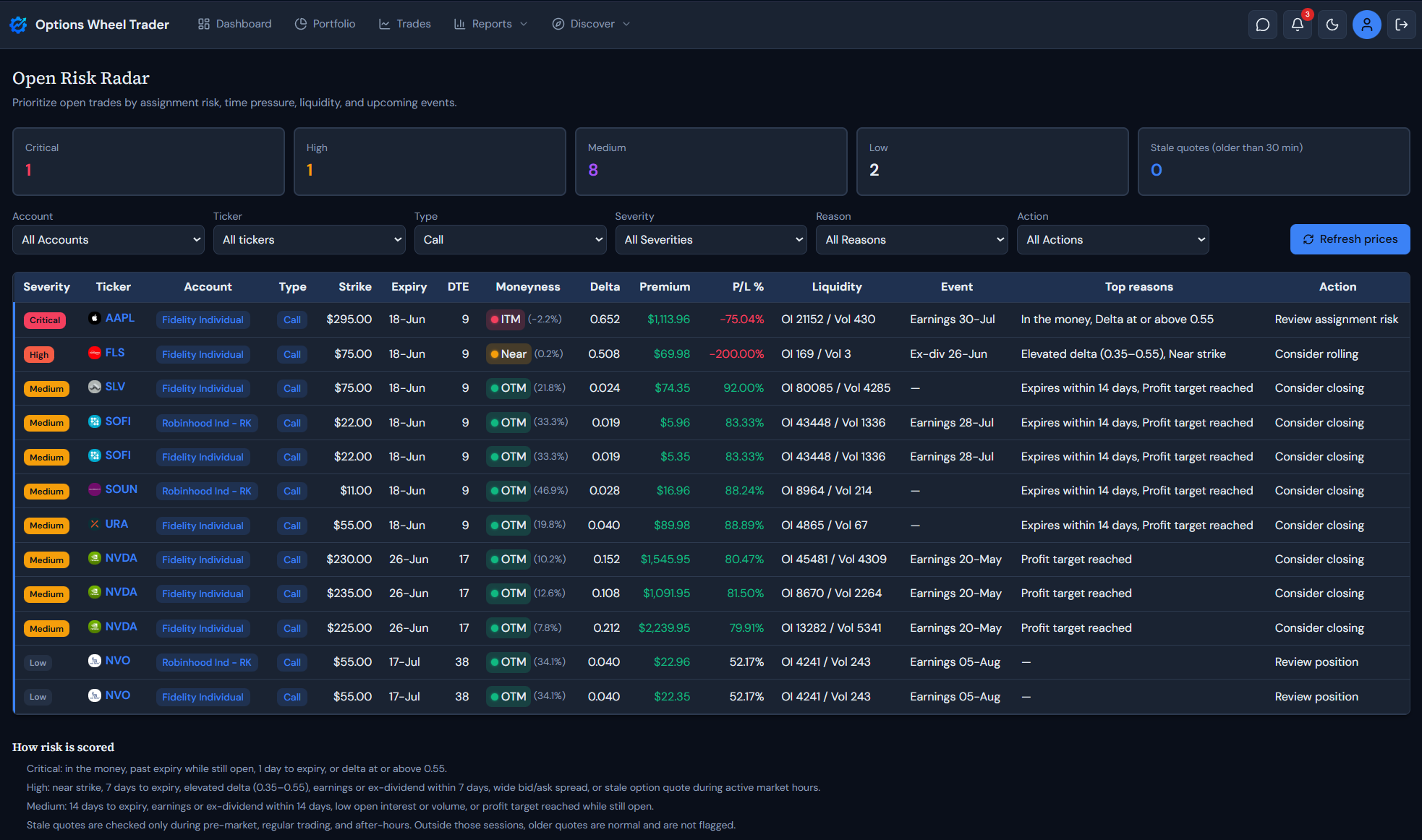
Open Risk Radar answers that by combining live trade fields (moneyness, delta, DTE, P/L, liquidity, events, quote freshness) into a single ranked view. You still make every decision. The report just orders the queue.
Summary cards at the top
When the report loads, five cards summarize your currently filtered open book:
| Card | What it counts |
|---|---|
| Critical | Trades scored at the highest severity |
| High | Trades with strong risk signals but below critical |
| Medium | Moderate time, event, liquidity, or profit-target pressure |
| Low | Open trades with no elevated risk factors in the model |
| Stale quotes (older than 30 min) | Trades whose option quote is older than 30 minutes during an active market session |
These counts update when you change filters, so you can narrow to one account or ticker and still see a quick risk snapshot.
Filters and refresh
Use the filter row to focus the ranked list:
- Account — all accounts or one brokerage account
- Ticker — dropdown of tickers in your open book
- Type — puts, calls, or all
- Severity — critical, high, medium, low, or all
- Reason — filter by a specific risk factor (in the money, near strike, DTE buckets, events, stale quote, and others)
- Action — filter by the suggested next step for that trade
Click Refresh prices to request updated quotes for all open trades shown in the report, then reload the rankings. Use this when stale-quote flags appear during market hours or before a detailed review.
Filter choices are remembered the next time you open the report.
The ranked trade list
Each open trade appears in a table on desktop or as a card on mobile. Rows are sorted by severity first, then score, days to expiry, and ticker.
Columns and fields worth knowing
- Severity — Critical, High, Medium, or Low badge
- Ticker, account, type — identity and context
- Strike, expiry, DTE — contract structure and time left
- Moneyness — ITM, Near, or OTM badge (same legend style as the Trades screen), with distance to strike in parentheses when available
- Delta — current option delta from live quotes
- Premium and P/L % — current open P/L in dollars and captured profit percentage
- Liquidity — open interest and volume when quote data is present
- Event — next earnings or ex-dividend date on the underlying (whichever is sooner)
- Top reasons — up to two contributing risk factors on desktop
- Action — one suggested next step based on the strongest signals
On mobile, the card shows account and severity on the first row, trade details on the second, then a compact grid for moneyness, DTE, premium/P/L %, delta, liquidity, and events. Reasons and action appear at the bottom.
Click the ticker link to open the trade for editing.
How severity is scored
The report evaluates each open trade against a fixed set of risk factors. The highest-severity factor wins for that trade. The footer section How risk is scored on the report page lists the same rules.
Critical
- In the money
- Past expiry while still marked open
- One day or less to expiry
- Delta at or above 0.55 (absolute)
High
- Near strike
- Seven days or less to expiry
- Elevated delta (roughly 0.35 to 0.55)
- Earnings or ex-dividend within seven days
- Wide bid/ask spread
- Stale option quote during an active market session
Medium
- Fourteen days or less to expiry
- Earnings or ex-dividend within fourteen days
- Low open interest or volume
- Profit target reached while the trade is still open
Stale quotes
A quote counts as stale only when the underlying market is in pre-market, regular, or after-hours session and the option quote timestamp is more than 30 minutes old. When the market is closed, older quotes are expected and are not flagged.
Your profit target percentage from account settings is used when checking whether profit target has been reached.
Suggested actions
Each trade gets one primary action to reduce decision fatigue:
| Action | Typical trigger |
|---|---|
| Close or update trade status | Past expiry while still open |
| Review assignment risk | In the money |
| Consider rolling | Elevated or high delta |
| Consider closing | Profit target reached |
| Monitor closely | Near strike or short DTE |
| Refresh prices | Stale quote during market hours |
| Review position | Default when no stronger signal applies |
Use the Action filter when you want a task list, for example all trades where the report suggests Consider rolling today.
Suggested workflow
A practical rhythm many Pro users can follow:
- Open Open Risk Radar after quotes have had time to load (or tap Refresh prices first).
- Scan summary cards for critical/high counts and stale quotes.
- Leave filters on All for a book-wide pass, or filter to one account you manage actively.
- Work top to bottom on critical and high rows before lower severities.
- Use Reason or Action filters when you want to batch similar follow-ups (events this week, rolls to consider, and so on).
- Jump into the trade from the ticker link, then return and filter out what you handled.
Run this once per session during market hours when you manage short premium. It stays fast because scoring runs in the browser on trades you already track.
Important notes
- The report is decision support, not trade instructions.
- Rankings depend on recorded trade status, quote freshness, and market data fields on each trade.
- Missing delta, liquidity, or event dates simply skip those factors rather than guessing.
- Pro plan required for full access.
Treat the radar as a prioritized to-do list for open risk, not a signal to close every flagged trade.
Ready to use Open Risk Radar?
Sign in on a Pro plan and open Plan → Open Risk Radar to rank your open book.
Get started with Options Wheel Trader
Legal disclaimer
The Open Risk Radar report and this article are provided for informational and educational purposes only. They do not constitute financial, investment, tax, or legal advice.
Options trading involves substantial risk and is not suitable for all investors. Assignment, liquidity, volatility, and execution conditions can produce losses beyond expected premium.
Report outputs use product scoring rules and your stored trade data. They do not guarantee future performance, trade quality, or profitability.
Always confirm contract details, risk exposure, and account eligibility with your broker before placing any trade.
Past performance is not indicative of future results. Options Wheel Trader is not a broker-dealer, does not execute trades, and does not provide individualized investment advice.
Review our Terms, Privacy Policy, and consult a qualified financial professional as needed.