 Options Wheel Trader
Understanding the Trade Insights Report
April 22, 2026
Introduction
If you trade the wheel consistently, you probably track premiums and outcomes already. The harder part is understanding what is actually driving your wins and losses over time.
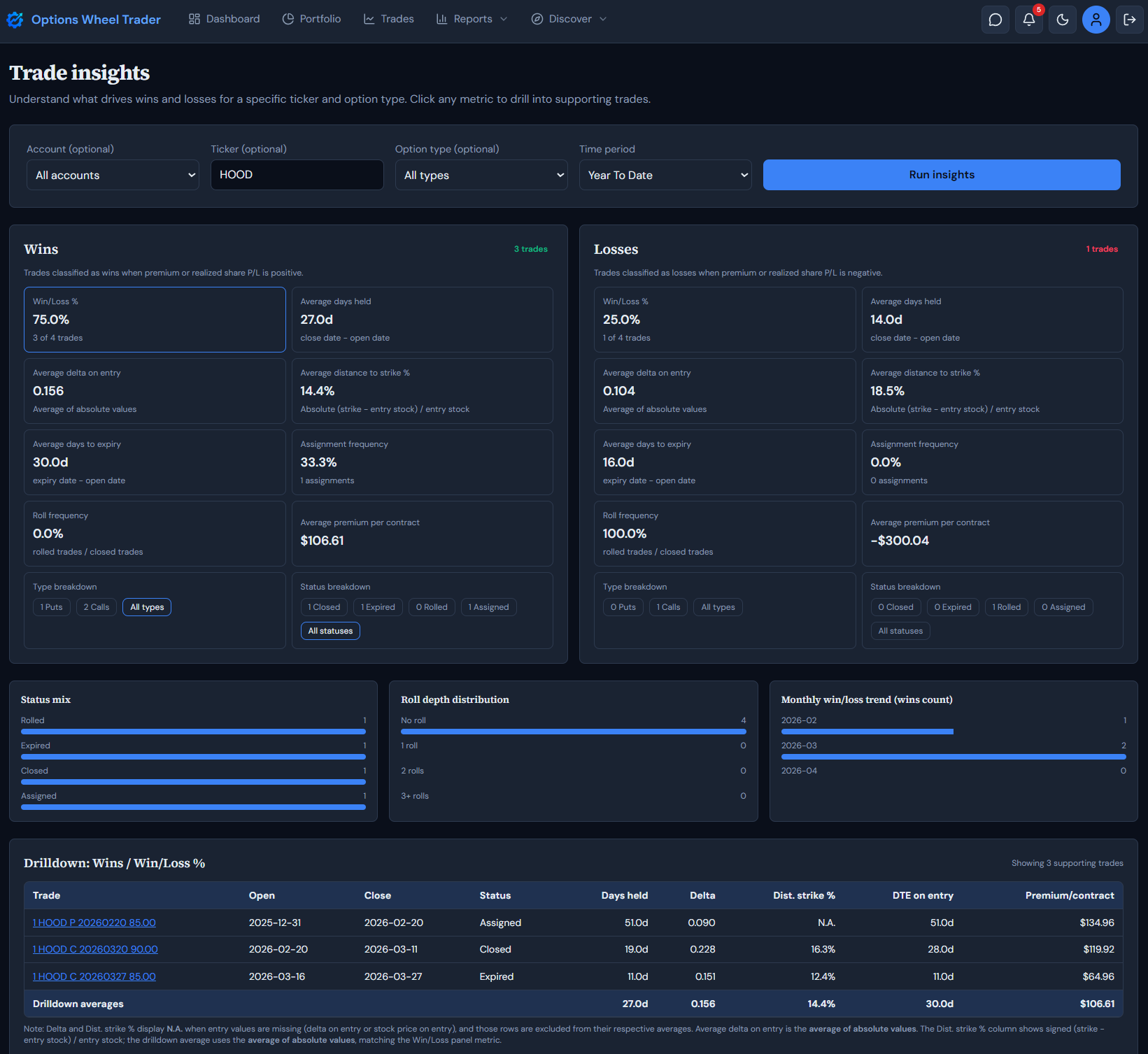
The Trade Insights report in OptionsWheelTrader is built for that. It gives you a side-by-side view of wins and losses, then lets you click into each metric and inspect the exact trades behind it.
Where to Find It
In the app, open Reports and choose Trade insights. (The report is available on Active and Pro plans.)
What Problem This Report Solves
Trade logs tell you what happened. This report helps you see why certain patterns are showing up by grouping your closed trades across:
- Option type (puts, calls, or both)
- Time period
- Account
- Ticker
From there, it classifies outcomes into Wins and Losses and computes the same core metrics for each side.
How the Report Works
1) Set filters and run insights
Use the filter bar to choose:
- Account (optional)
- Ticker (optional)
- Option type (all, put, or call)
- Time period preset
Then click Run insights.
2) Review the Wins and Losses panels
After you run the report, you get two panels:
- Wins: trades classified as wins when premium and/or realized share P/L is positive.
- Losses: trades classified as losses when premium and/or realized share P/L is negative.
Because both panels use the same metric set, it is easy to compare behavior.
3) Click metric cards to drill deeper
You can click any metric card to open a drilldown table with supporting trades. Metrics include:
- Win/Loss %
- Average days held
- Average delta on entry
- Average distance to strike %
- Average days to expiry
- Assignment frequency
- Roll frequency
- Average premium per contract
This is where the report becomes useful in practice. You can quickly see patterns such as losses clustering around shorter DTE or tighter distance to strike.
4) Slice by type and status in each panel
Each panel includes:
- Type breakdown chips (Puts, Calls, All types)
- Status breakdown chips (Closed, Expired, Rolled, Assigned, All statuses)
These chips let you isolate a subset before reviewing the drilldown table.
5) Use mini charts for context
Below the panels, the report includes quick visual summaries for:
- Status mix
- Roll depth distribution
- Monthly win/loss trend
These charts help you sanity-check whether a metric difference is broad or driven by a small cluster.
6) Inspect the trade-level drilldown
The drilldown table shows the specific trades behind the selected metric, including:
- Trade label (linked to the trade)
- Open and close dates
- Status
- Days held
- Delta on entry
- Distance to strike %
- DTE on entry
- Premium per contract
At the bottom, you also get drilldown averages for quick comparison.
Suggested Workflow
A simple process many traders can use:
- Start with All types and a broad time period.
- Compare win and loss metrics at a high level.
- Click one metric with a clear gap (for example, days held or delta).
- Narrow by status or option type.
- Review supporting trades and identify repeatable setup traits.
- Convert the finding into an explicit rule for your next cycle.
Run this process regularly and your decision-making usually becomes more consistent and less reactive.
Important Notes
- This report is for analysis and process improvement.
- Insight quality depends on the quality of your recorded trade data.
- Missing entry values can affect some metrics.
Treat the report as decision support, not autopilot.
Ready to Use Trade Insights?
Open Reports -> Trade insights in your account and start identifying repeatable patterns in your wins and losses.
Get started with OptionsWheelTrader for free
Legal Disclaimer
The Trade insights report and this article are provided for informational and educational purposes only and do not constitute financial, investment, tax, or legal advice.
Options trading involves substantial risk and is not suitable for all investors. You can lose money, including more than expected, depending on assignment, liquidity, volatility, and execution conditions.
Report outputs are based on your historical trade records and product classification rules. They do not guarantee future performance, trade quality, or profitability.
Always confirm contract details, risk exposure, and account eligibility with your broker before placing any trade.
Past performance is not indicative of future results. OptionsWheelTrader is not a broker-dealer, does not execute trades, and does not provide individualized investment advice.
Review our Terms, Privacy Policy, and consult a qualified financial professional as needed.